 Insights
How to Prepare a Claim for Review in DaDepo
Follow a claim file from document upload and reviewed findings to an Asset Passport working record, with a separate route to issuance and controlled review. A practical example keeps a €4 million claim, a €1.2 million settlement and €400,000 collected distinct, and shows where to record ownership, security, funding and unanswered questions.
This starts a temporary private draft. It is not public, listed for sale or shared automatically.
Companion to A Claim Is Not Its Proceeds: What First Brands Reveals About Litigation Assets.
The parent article explains why a claim, a right to recoveries and security over those recoveries need to be understood separately. The practical question is how to make those distinctions visible in a file that someone else can review.
At a glance
DaDepo helps you prepare a claim file for review:
- Collect and check: upload the relevant documents, review AI findings and retain missing evidence or unanswered questions.
- Keep the amounts distinct: the claim amount, settlement amount and cash received each need their own source and date.
- Prepare and share: save a private draft. Where available, complete the required checks and separately confirm Passport issuance and access for a named reviewer.
- Control document access: sharing a Passport does not automatically share its underlying documents. If the owner requires an NDA, the reviewer must sign it before receiving authorized document access.
In DaDepo, start with the documents, review the suggested information and prepare a clear asset record. An eligible owner can then take separate steps to issue an Asset Passport version and give a named reviewer access.
Here, a “claim and proceeds map” means a reviewed account of the parties, rights, amounts and supporting evidence. It can be prepared using the document workflow and a written schedule today; dedicated fields connecting every claim, funding right and recovery are a further development direction.
One claim file, several different things to record
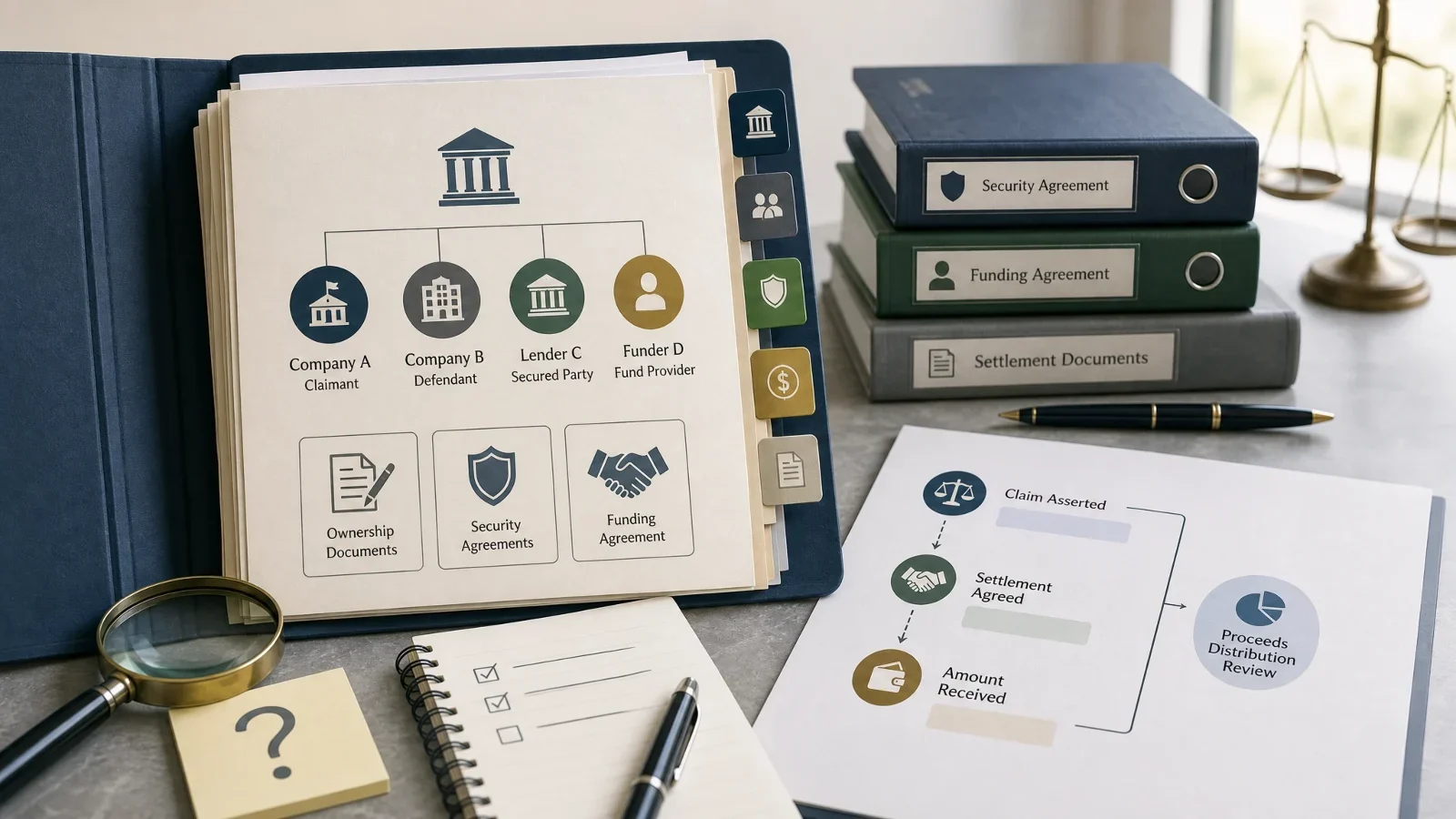
Consider a fictional file. Company A asserts a €4 million claim against Company B. Lender C has a security agreement referring to proceeds of specified claims. Funder D has a separate contractual return linked to recoveries. A later settlement provides for €1.2 million, and payment records evidence €400,000 received.
The owner wants an adviser to review the claim and the existing rights over its recoveries. The file should answer these questions without making the adviser reconstruct the whole story:
| Item in the map | What the example records | Evidence and question to preserve |
|---|---|---|
| Underlying claim | Company A asserts €4m against Company B. | Complaint and damages schedule. Is this still the current claim position? |
| Ownership position | Company A is the stated claimant; any later assignment must be checked. | Originating documents and any assignment. Is the ownership chain complete? |
| Security over proceeds | Lender C is named in the security agreement. | Collateral clause and schedules. Does the wording cover this claim's proceeds, the claim itself, or both? |
| Funding entitlement | Funder D has a return described in a separate agreement. | Funding agreement and amendments. Which return terms currently apply? |
| Settlement | €1.2m is the agreed settlement amount. | Executed settlement, payment schedule and release terms. What happens to the original claim, and when? |
| Cash received | €400,000 is evidenced as collected. | Payment record and date. What remains unpaid, disputed or subject to other parties' rights? |
This is a preparation schedule, not a list of dedicated DaDepo fields. Keep it in the reviewed description where suitable, or in a supported document attached to the package. The source documents remain necessary to interpret each entry.
Where the work happens in DaDepo
For a new file, start a private claim draft. If you already have an account and want to start an owned document package, open Collect Documents.
For an existing claim, open My Assets, choose Manage for the relevant asset and continue to its Asset Passport. Later screens belong to that specific asset, so use its own navigation rather than starting another upload package.
The table follows the preparation and Passport journey. Issuance and recipient access are later steps, available where the workflow is enabled and its requirements are met. Button wording can vary by interface language.
| Step | Where to go | What you do and what it produces |
|---|---|---|
| 1. Collect the file | Private claim draft, or Collect Documents after sign-in. | Upload permitted claim, ownership, security and funding documents. Add current orders, settlement and payment evidence. The public entry begins a temporary private draft; sign in and confirm its import to continue in your account. |
| 2. Check the findings | Collect Documents → AI findings. | Where analysis is available, compare candidate facts with the source; accept, edit, reject or ignore findings. Keep amounts and dates in context. Analysis assists review; it does not establish legal rights. |
| 3. Save the reviewed draft | Continue from the document step to the editable asset draft. Return through My Assets. | Describe exactly what is being reviewed, retain the claim/proceeds schedule and confirm the save. This creates the working asset record, with the supporting documents and applicable reviewed-finding provenance. |
| 4. Check the Passport basis | Asset Passport → Review evidence and analysis. | Inspect the included evidence, analysis coverage, recorded findings and gaps. Correct the description or supply missing documents. A file being uploaded does not mean its analysis or review is complete. |
| 5. Sign and assess readiness | Asset Passport → Review and sign this revision, then See criteria and authorized next steps. | Complete the required identity/authority checks, review the exact revision and owner declaration, and confirm signing. Resolve issuance blockers and review remaining warnings. Signing and readiness assessment are separate from issuance. |
| 6. Issue a version, if needed | Asset Passport → Review order and issue Passport. | Review the current quote and public-verification notice, then explicitly confirm. Successful issuance creates a numbered, immutable Passport version that can be viewed and, where permitted, downloaded as a PDF. |
| 7. Give a reviewer access | Asset Passport → Version history and access → select the issued version and its sharing action. | Choose the named recipient, access deadline and PDF permission. The recipient completes the required identity/KYC steps. Source-document access is separate: if the owner requires an NDA, the reviewer must sign it before access to those documents is granted. |
| 8. Revise after new evidence | Asset Passport → Open same-asset correction workspace for an issued record. | Add or correct evidence through the asset's working-revision workflow, review and sign again, and explicitly issue a new version when ready. Earlier issued versions retain their own history; a new version needs its own sharing decision. |
You can stop after preparing the private record. Issuing or sharing a Passport is a further choice, not a requirement for organizing the file. Review the charges shown before starting paid analysis or confirming a later operation.
- Claim and ownership documents
- Security and funding terms
- Settlement and payment evidence
- Human-reviewed facts and open questions
The diagram shows the inputs to preparation. Steps 5–7 are separate decisions about signing, issuance and access.
Make the map useful at the point of review
Three details turn this example into a useful handover.
Keep the exact collateral wording and its location. Suppose the security agreement says “all proceeds received from the claims identified in Schedule 2.” Record the agreement version, clause 4.2 and the reference to Schedule 2. If that schedule is missing, preserve the question: “Coverage of this claim remains unresolved because Schedule 2 has not been supplied.” DaDepo helps keep the agreement and review note together; counsel determines the legal effect.
Give every amount a meaning, date and source. In this file, €4m is the amount asserted, €1.2m is the settlement amount and €400,000 is cash evidenced as received. They are neither three valuations nor three amounts to add together. Do not replace the claim amount with the latest number simply because it appears in a newer document. Preserve the sequence and check the settlement's effect on the original claim.
Record the question that remains, not a stronger conclusion. An assignment reference calls for the transfer document. A funding amendment calls for checking which terms govern. An allegation in a complaint should remain attributed to the claimant unless another source supports a different status. AI may help surface relevant text, but the reviewer must check the source and wording. Keep unresolved items in the schedule even when the platform has no dedicated field for them.
A concise reviewed description might read:
Company A's asserted claim against Company B was originally stated at €4m. The supplied settlement provides for €1.2m; payment evidence records €400,000 received as of the review date. Lender C's agreement refers to proceeds of claims in Schedule 2, which has not been supplied. Funder D's recovery entitlement is described in the funding agreement. Ownership, the effect of the settlement and the scope of competing rights require review against the complete documents.
Add the actual source references and review date before saving. The example does not calculate a net recovery or decide who should receive the €400,000.
Share the right version and the right material
Before giving an adviser or potential funder access, inspect the exact Passport version they will receive. A summary may itself repeat confidential information even when the underlying document is restricted.
Passport access and document access are separate. A Passport invitation does not automatically open the pleadings, funding agreement, bank evidence or other source files. If the owner requires an NDA for the underlying documents, the reviewer must sign it before access to those documents is granted. The Passport invitation does not replace or bypass that requirement. Access must also be authorized under the document's permissions; signing an NDA alone does not grant unrestricted access. Have the authorized team assess privilege and prepare any approved redactions before disclosure.
Public verification has a narrower purpose: it exposes the Passport number, version, issuance date and current status. It does not expose the full claim file or establish the legal validity of the claim.
When another payment arrives, update the working record with the new evidence and its date. Where appropriate, issue and share a new version so the recipient knows which position they are reviewing. This process depends on documents supplied by the responsible team; it does not imply automatic court or bank updates.
A natural next step: a dedicated claim-and-proceeds view
The same preparation workflow could become easier through a dedicated view linking claim → settlement or judgment → recorded recovery, with ownership evidence, security and funding terms attached to the relevant object.
That extension should let a reviewer distinguish amount types, inspect the source and effective date of each relationship, and keep missing evidence or disputed assertions visible as the file changes. For example, Lender C's security could be linked specifically to proceeds while Funder D's contractual return remains a separate relationship.
This is a development direction, not a statement that those specialized screens or automated checks are currently available. The practical starting point is the reviewed schedule and document package described above. Legal interpretation, valuation, priority and distribution decisions remain with the responsible professionals and parties.
Start with the question your reviewer needs to answer
Bring the claim document, ownership evidence and the agreements describing security and funding. Add the latest settlement, order or payment record. State whether the review concerns the claim itself, rights to recoveries or financing the pursuit of the claim.
Prepare a private claim draft, or return to an existing asset.
For the broader document workflow, see What Is an Asset Passport?.